Batter widget
Simple and easy-to-install widget for Awesome Window Manager.
This widget consists of:
-
an icon which shows the battery status:

-
a pop-up window, which shows up when you hover over it:
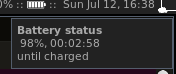
-
a pop-up warning message which appears when battery level is less that 15%:
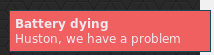
Installation
This widget uses the output of acpi tool.
- install
acpitool:
sudo apt-get install acpi-
clone/copy battery.lua file and battery-icons folder to your ~/home/username/.config/awesome/ folder;
-
include
battery.luaand add battery widget to your wibox in rc.lua:
require("battery")
right_layout:add(batteryIcon)
Volume widget
Simple and easy-to-install widget for Awesome Window Manager.
This widget represents the sound level: 
Installation
-
clone/copy volume.lua file and volume-icons folder to your
~/home/username/.config/awesome/folder; -
change path to the icons in
volume.lua:
widget:set_image("/home/<username>/.config/awesome/volume-icons/" .. volumeLevel .. ".png")- include
volume.luaand add volume widget to your wibox in rc.lua:
require("volume")
right_layout:add(volume_widget)