
After more than 10 years of daily use, my Audio Technica m50x headphones are still going strong. These studio monitor headphones have been my constant companion through countless hours of music, gaming, and work calls. But like any well-loved piece of equipment, they’ve had their share of problems. Here’s everything I’ve learned about maintaining and repairing them over the years.
Modifications
Over the years, I’ve made a couple of modifications to personalize and improve the functionality of my m50x headphones.
dbrand Skins (2016)
Back around 2016, dbrand was selling custom skins specifically designed for the Audio Technica m50x. I picked up a set and applied them to give my headphones a unique look and add some extra protection to the plastic surfaces.
The result: Nearly 9 years later, those dbrand skins are still on my headphones! They’ve held up remarkably well, with minimal peeling or wear.
Unfortunately, dbrand no longer makes skins for the m50x, but if you can find old stock or similar products, they’re worth considering for both aesthetics and protection.
Microphone (2020)
When COVID hit in 2020 and I suddenly found myself in endless Zoom meetings, I realized the m50x’s lack of a built-in microphone was a problem. I needed a solution that would let me use my beloved headphones for work calls without sacrificing audio quality. Here’s what I did:
Luckily, the m50x has detachable cables - this is one of the key improvements over the original ATH-M50, which had a fixed cable. I found a compatible replacement cable on Amazon that has a built-in microphone. The m50x uses a proprietary 2.5mm locking connector on the headphone side, but these aftermarket cables are designed to work with it, here is a picture of the cable I use:

Problem #1: Ear Pad Wear and Tear
When it happens: Every 12-18 months with daily use
Symptoms:
- Pleather starts flaking off
- Pads become flat and uncomfortable
- Black flakes on your ears and shoulders
The Solution:
This is the most common issue, and thankfully the easiest to fix. I just order a set of new ear pads from AliExpress every few years. The important thing I learned is that there are two types of pads: leather and foam. The leather ones are much better at noise isolation, but the foam ones are more comfortable for long sessions.
Problem #2: Headband Wear and Tear
When it happens: After 3-5 years of regular use
Symptoms:
- Pleather on the headband starts cracking
- Uncomfortable pressure on top of head
The Solution:
This one is also a common issue, however it’s a bit more annoying to fix. The common solution is to use a cover wrap, but it looks quite ugly. I don’t remember how this idea came to my mind, but I thought that bike handlebar tape would be a perfect solution for this problem. It’s quite cheap and durable, there are many colors to choose from, and it looks much better than a cover wrap. The installation is also very simple - unscrew the headband, wrap the tape around it, and screw it back in place, no glue is needed. The only improvement I can think of is to put a small strip of soft foam tape on the inside of the headband, so it would be a bit softer.

Problem #3: Broken Hinge
When it happens: After 8-9 years of regular use
Symptoms:
- One ear cup doesn’t press against your head as firmly as the other
- Headphones don’t sit evenly on your head
- Reduced comfort and sound isolation on one side
The Problem:
At around 8-9 years of usage, I noticed my headphones weren’t sitting on my head properly anymore. The right ear cup wasn’t pressing as firmly as the left one, which was very annoying. After some investigation, I discovered the issue was with the hinge mechanism - there is a tiny piece of plastic that prevents the ear cup from over-extending. This piece had cracked and fallen off, preventing the headphones from sitting well on my head.
The Solution: Zip Ties
This problem stumped me for a few weeks, but the solution turned out to be surprisingly simple: small zip ties.
What you need:
- 4-5 small zip ties (2.5mm width works well)
- Scissors for trimming excess
How to fix it:
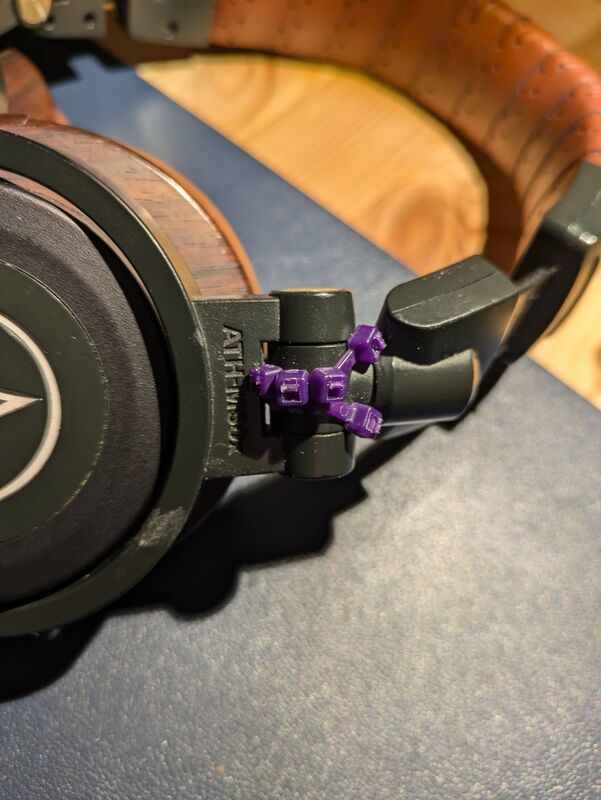
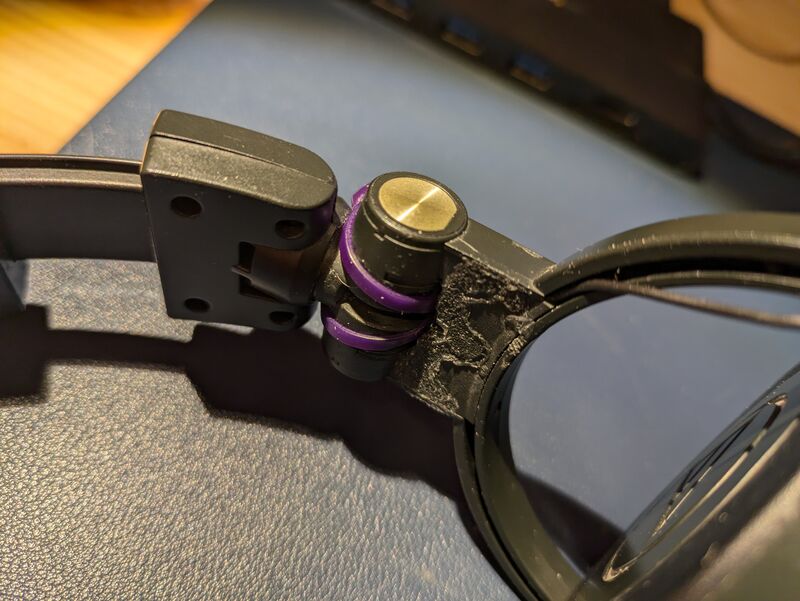
- Wrap two zip ties around the hinge mechanism, one on each side
- On the outside of the headband, right above the engraved model name, wrap a zip tie around these two zip ties from the previous step. The tie head will serve as a stop for the ear cup.
- Add as many zip ties as needed to prevent the ear cup from over-extending. In my case I had 2 for a couple of weeks, then added a third one.
Check the pictures below to see exactly how I positioned them. The difference was immediate - my headphones finally sat properly on my head again, with even pressure on both sides.
Problem #4: Broken Speaker (2025)
When it happens: Can happen at any time, but more likely after many years of use
Symptoms:
- One side completely stops producing sound
The Problem:
This was a big problem - one side just stopped working. I disassembled the headphones a few times, but didn’t find anything suspicious. This was quite upsetting, so I started to look for a new pair (this time I wanted white ones), as I thought this problem would be hard to fix.
The Solution:
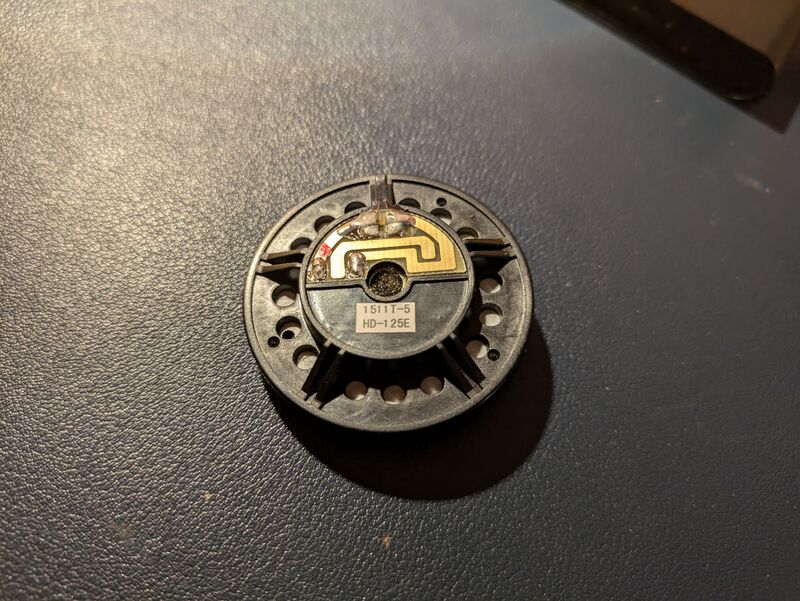
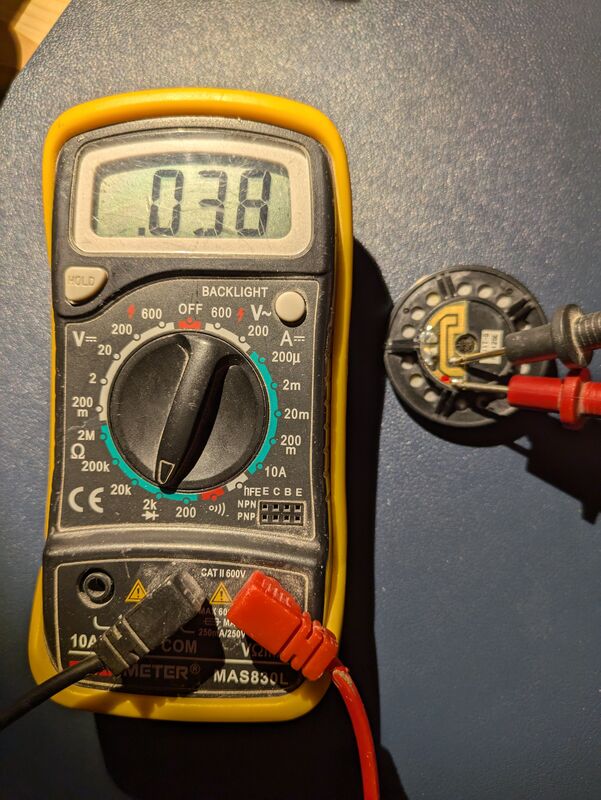
But then I found this video which explains that the issue might be a broken speaker. To diagnose it, you should measure the resistance using a multimeter. This was exactly my case!
How to fix it:
- Use a multimeter to test the speaker resistance (working speaker should show 38 ohms)
- Contact Audio Technica support to order a replacement speaker (~$15-20 USD including delivery)
- Solder the new speaker in place (not difficult if you have basic soldering skills)
The repair brought my headphones back to life and saved me from having to buy a new pair.
Final Thoughts
Ten years is a very long time in the world of consumer electronics. The fact that my Audio Technica m50x are still my daily drivers speaks volumes about their quality and repairability.
Yes, I’ve had to replace parts and make repairs, but that’s exactly what makes these headphones special - they can be repaired. In an age of disposable electronics, the m50x stands out as a product that’s built to last and designed to be maintained, at least in my experience.
If you’re considering buying a pair, or if you already own them and are facing some of the issues I’ve described, I hope this guide helps you get many more years of enjoyment from these headphones.